
Building a CI/CD Pipeline for Monorepos
A secure, multi-stage CI/CD pipeline for pnpm monorepos with automated deployments, security scanning, and OWASP DSOMM compliance.
The Challenge
Running a monorepo with multiple apps (web, blog, auth) that all deploy independently requires a thoughtful CI/CD strategy. The requirements:
- Independent deployments - Only deploy apps that actually changed
- Preview environments - Test on
developbefore promoting tomain - Security scanning - Catch vulnerabilities before they ship
- Fast feedback - Know if something breaks within minutes
Here's the architecture:
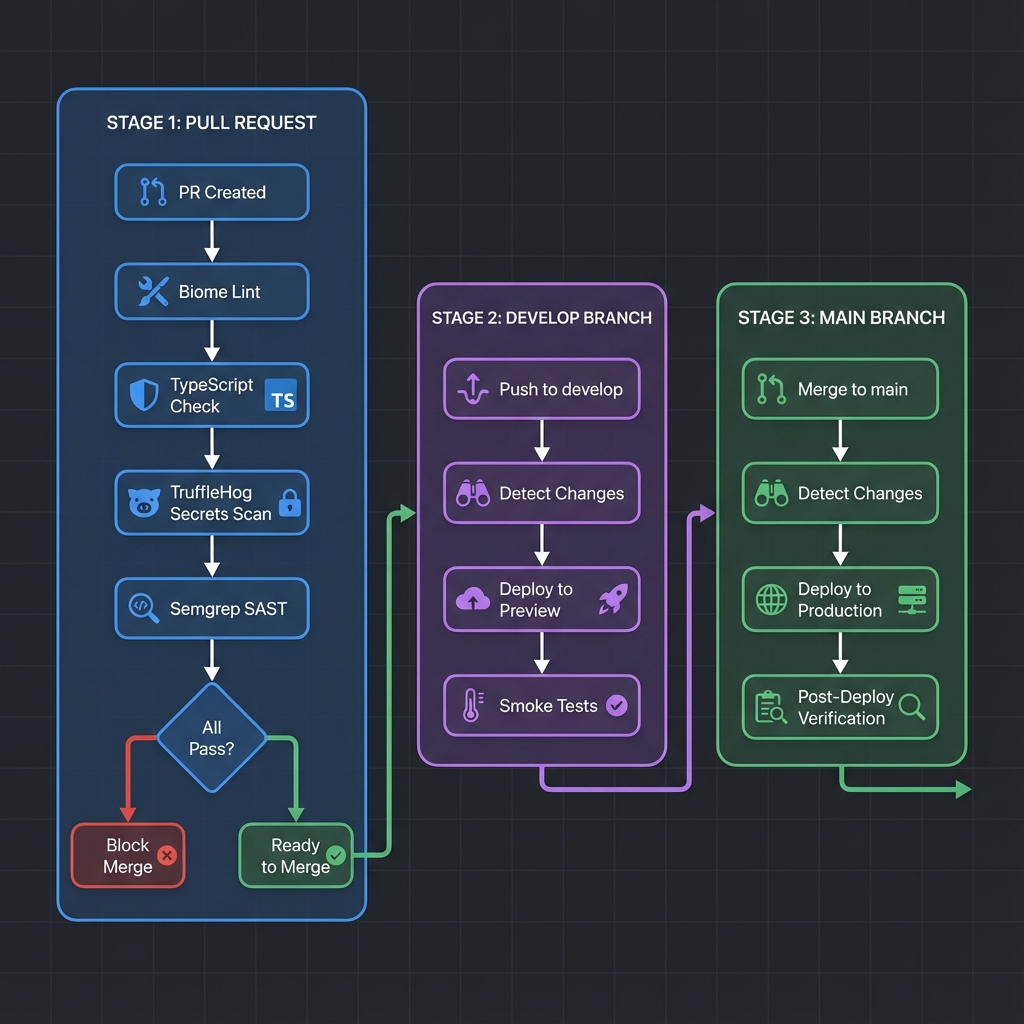
Pipeline Architecture
The CI/CD pipeline consists of 5 GitHub Actions workflows:
| Workflow | Trigger | Purpose |
|---|---|---|
pr-checks.yml | Pull Request | Lint, type check, secrets scan, SAST |
deployment.yml | Push to main/develop | Deploy changed apps |
scan-packages.yml | Push + Schedule | Dependency vulnerability scanning |
post-deploy.yml | After deployment | Smoke tests |
sbom.yml | Push to main + Tags | Generate Software Bill of Materials |
DSOMM Compliance
This pipeline was designed with the OWASP DevSecOps Maturity Model (DSOMM) in mind, achieving Level 3 across most dimensions.
Smart Change Detection
In a monorepo, deploying every app on every commit is wasteful. The paths-filter action detects which apps changed:
jobs:
  detect-changes:
    runs-on: ubuntu-latest
    outputs:
      web: ${{ steps.filter.outputs.web }}
      blog: ${{ steps.filter.outputs.blog }}
      api: ${{ steps.filter.outputs.api }}
    steps:
      - uses: actions/checkout@v6

      - uses: dorny/paths-filter@v3
        id: filter
        with:
          filters: |
            web:
              - 'apps/web/**'
              - 'packages/**'
              - 'pnpm-lock.yaml'
            blog:
              - 'apps/blog/**'
              - 'packages/**'
              - 'pnpm-lock.yaml'
            api:
              - 'apps/api/**'
              - 'packages/**'
              - 'pnpm-lock.yaml'
Notice packages/** is included in each filter. Shared packages affect all apps, so any change there triggers a rebuild of dependent apps.
Each deployment job then conditionally runs:
deploy-web:
  needs: detect-changes
  if: needs.detect-changes.outputs.web == 'true'
  # ... deployment steps
Multi-Environment Deployment
Deployments go to two environments based on branch:
| Branch | Environment | URL Pattern |
|---|---|---|
develop | Preview | preview.domain.com |
main | Production | domain.com |
Here's how environment-specific deployments work:
- name: Deploy to Cloudflare Workers (production)
  if: github.ref == 'refs/heads/main'
  uses: cloudflare/wrangler-action@v3
  with:
    apiToken: ${{ secrets.CLOUDFLARE_API_TOKEN }}
    accountId: ${{ secrets.CLOUDFLARE_ACCOUNT_ID }}
    workingDirectory: apps/web
    command: deploy

- name: Deploy to Cloudflare Workers (preview)
  if: github.ref == 'refs/heads/develop'
  working-directory: apps/web
  run: |
    # Patch the worker name for preview
    sed -i 's/"name":"myapp"/"name":"myapp-preview"/g' \
        .output/server/wrangler.json
    npx wrangler deploy --config .output/server/wrangler.json
GitHub Secrets
The ${{ secrets.* }} values are stored in your repository's Settings → Secrets and variables → Actions. Never commit actual API tokens to your code.
PR Security Checks
Every pull request runs through a security gauntlet before merging:
Lint & Format (Biome)
Catches code quality issues and enforces consistent formatting:
- name: Run Biome lint & format check
  run: pnpm biome check . --diagnostic-level=error
TypeScript Type Checking
Ensures type safety across all apps:
- name: Run TypeScript type check on all workspaces
  run: |
    for dir in apps/*/; do
      if [ -f "${dir}tsconfig.json" ]; then
        echo "Type checking ${dir}..."
        cd "$dir" && pnpm exec tsc --noEmit || exit 1
        cd ../..
      fi
    done
Secrets Detection (TruffleHog)
Scans for accidentally committed secrets, API keys, and credentials:
- name: TruffleHog Secrets Scan
  uses: trufflesecurity/trufflehog@main
Why TruffleHog?
TruffleHog was chosen over Gitleaks because Gitleaks requires a paid license for organizations. TruffleHog is completely free and open source.
SAST Scanning (Semgrep)
Static Application Security Testing to find vulnerabilities in code:
- name: Run Semgrep
  uses: semgrep/semgrep-action@v1
  with:
    config: >-
      p/javascript
      p/typescript
      p/react
      p/nodejs
      p/security-audit
      p/secrets
Dependency Scanning
A multi-tool approach catches vulnerabilities in dependencies:
# Run daily + on push + on PR
on:
  push:
    branches: [develop, main]
  pull_request:
    branches: [develop, main]
  schedule:
    - cron: "0 2 * * *"  # Daily at 2 AM
Three scanners work together:
| Scanner | Purpose |
|---|---|
| pnpm audit | npm/pnpm-specific vulnerability database |
| Trivy | Comprehensive filesystem scanner |
| OSV Scanner | Google's open-source vulnerability database |
Results are displayed in the GitHub Actions summary and uploaded as artifacts:
For a deeper dive into dependency scanning, see the dedicated article: Scanning Dependencies for Vulnerabilities
Post-Deploy Verification
After every deployment, smoke tests verify the apps are actually working:
smoke-tests:
  name: Smoke Tests
  runs-on: ubuntu-latest
  if: ${{ github.event.workflow_run.conclusion == 'success' }}

  steps:
    - name: Check web app (production)
      if: github.event.workflow_run.head_branch == 'main'
      run: |
        status=$(curl -s -o /dev/null -w "%{http_code}" https://domain.com)
        if [ "$status" = "200" ]; then
          echo "✅ domain.com: $status" >> $GITHUB_STEP_SUMMARY
        else
          echo "❌ domain.com: $status" >> $GITHUB_STEP_SUMMARY
          exit 1
        fi
SBOM Generation
For supply chain security, a Software Bill of Materials is generated on every release:
- name: Generate SBOM with Syft
  uses: anchore/sbom-action@v0
  with:
    format: cyclonedx-json
    output-file: sbom.cyclonedx.json

- name: Upload SBOM to Release
  if: startsWith(github.ref, 'refs/tags/')
  uses: softprops/action-gh-release@v2
  with:
    files: |
      sbom.cyclonedx.json
      sbom.spdx.json
Keeping Dependencies Updated
Dependabot handles automatic dependency updates:
version: 2
updates:
  # Each app gets its own update config
  - package-ecosystem: "npm"
    directory: "/apps/web"
    schedule:
      interval: "weekly"
    labels:
      - "dependencies"
      - "app:web"
    groups:
      dependencies:
        patterns: ["*"]

  # GitHub Actions versions
  - package-ecosystem: "github-actions"
    directory: "/"
    schedule:
      interval: "weekly"
    labels:
      - "dependencies"
      - "ci"
Local Development Commands
Before pushing, run these locally to catch issues early:
# Check all apps
pnpm check-types

# Or manually per app
for dir in apps/*/; do
  [ -f "${dir}tsconfig.json" ] && \
    (cd "$dir" && pnpm exec tsc --noEmit)
done
# Lint and format check
pnpm biome check .
# Auto-fix issues
pnpm biome check --write .# Run everything
pnpm check # Biome lint/format
pnpm check-types # TypeScriptNext Steps
Choosing Your Deployment Stack: A Framework for Modern Web Apps
Vercel vs Cloudflare Workers vs containers - how to think about control, complexity, and cost. Plus how Woltex deploys with Cloudflare Workers, Convex, and TanStack Start.
Start a Fumadocs Blog in 10 Minutes
Building in public? Sometimes you need more than X posts to document your journey; or to create comprehensive product documentation for your users. Here's how to set up a beautiful, fast documentation or blogging site with Fumadocs.